The revamped deckbuilder is here: Kingdom Duels Card Library
The deckbuilder has been rebuilt from the ground up and it is now the Card Library. It kept everything it did before but the way you browse, filter and create your decks has changed quite a bit.
Note: It also was moved to a new address: kingdomduels.com/cards. The old /deckbuilder/ links still work and will redirect you though.
Layout
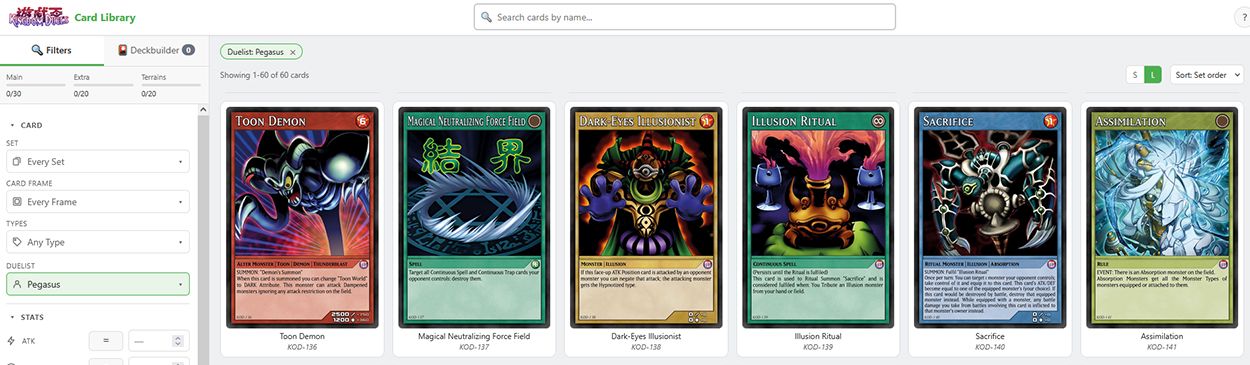
- The old grid showed 8 cards at a time on a 1080p screen, with the deck panel eating a third of the width. Now the filters and the deckbuilder share a single sidebar with two tabs, which leaves the rest of the page for the cards.
- 6 or 10 columns for cards (there is a S / L toggle in the toolbar).
- Cards already in your deck are highlighted in the grid.
- Filters, deck counters and pagination stay visible while you scroll. There are small counters on the sidebar for the deck progress too.
- Cards in the deckbuild are showing only as text so they are better presented without unnecessary scrolling, and have a hover with card information and a bigger image for quick reference.
- Rows in the deck have − and + buttons, so changing from three copies to two no longer means deleting the card and finding it again.
- Just as before: left click adds a card to the corresponding deck, right click shows it enlarged.
Searching
There is now a single search bar at the top, and typing a plain name just works. The scryfall-style syntax is still there if you want it, and the ? button next to the bar lists every field.
- Filters apply as you type, so the “Apply Filters” button is gone. Whatever you filter shows up as removable green chips above the grid.
- Every dropdown is now searchable and tells you how many cards each option has. This includes the new duelist and types dropdown.
- ATK, DEF, Bonus ATK and Bonus DEF now have visible >= > <= < != operators. Those things always worked, but you had to know the syntax to use them.
- Grade and its value work as a pair: pick a Grade and then the value control adapts to it (for example picking Level shows a numeric control while Glyph shows a dropdown of options).
- Alternative artworks are now combined with the base ones so they are easier to find, browse and add to your deck.
Effect Search
Something that was requested for a while: You can now search the actual effect text of every card (finally!, lol)